Google Shopping: Master Product Optimization from A to Z
To achieve the highest efficiency for your Google Shopping campaign, optimizing product data at the source is a core step. This guide provides an A-to-Z walkthrough on how to standardize data optimization to maximize conversion rates.
1. What Is Google Shopping and How Does It Work?
To achieve high campaign efficiency, businesses must first understand Google Shopping's operating mechanism and how the platform processes product data.
1.1. What Is Google Shopping?
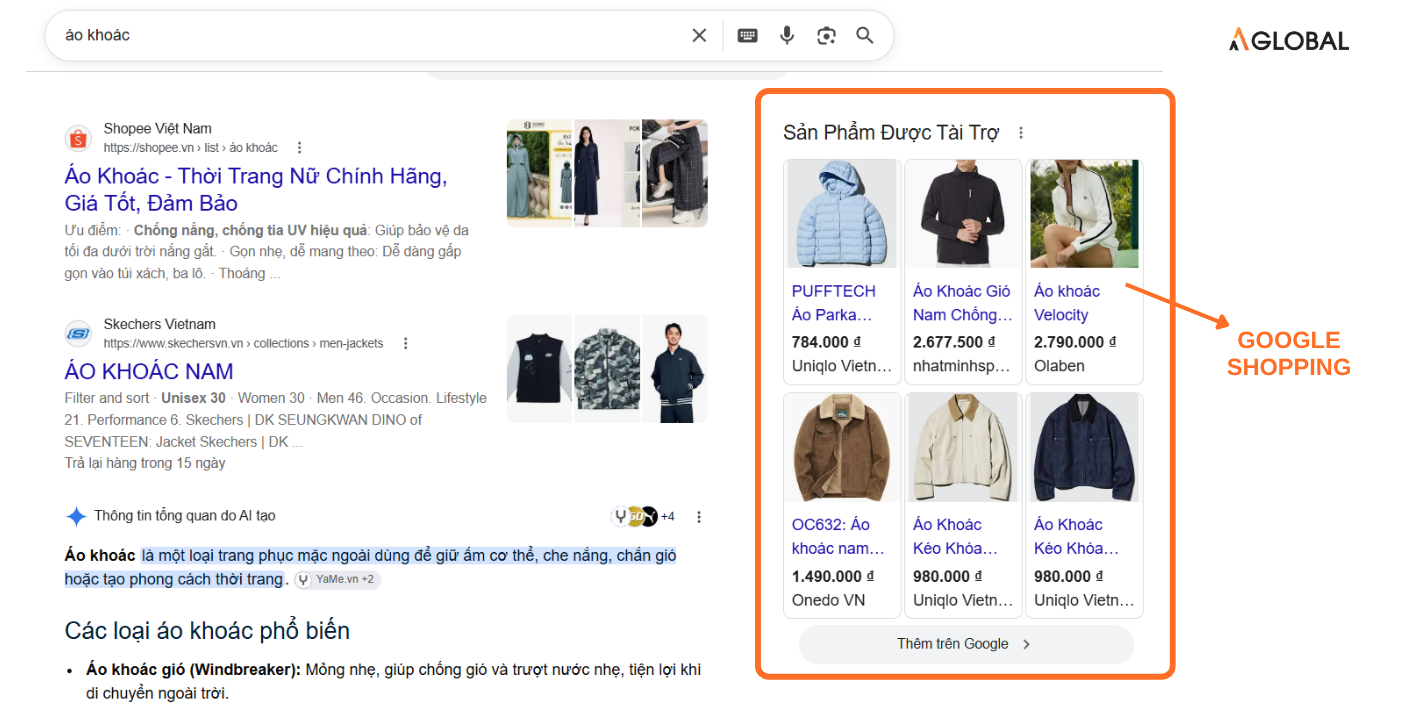
Google Shopping is Google's visual advertising platform that allows sellers to display images, prices, product names, and brands directly on search engine results pages when users actively search to buy a specific item.
1.2. Core Components of Google Shopping
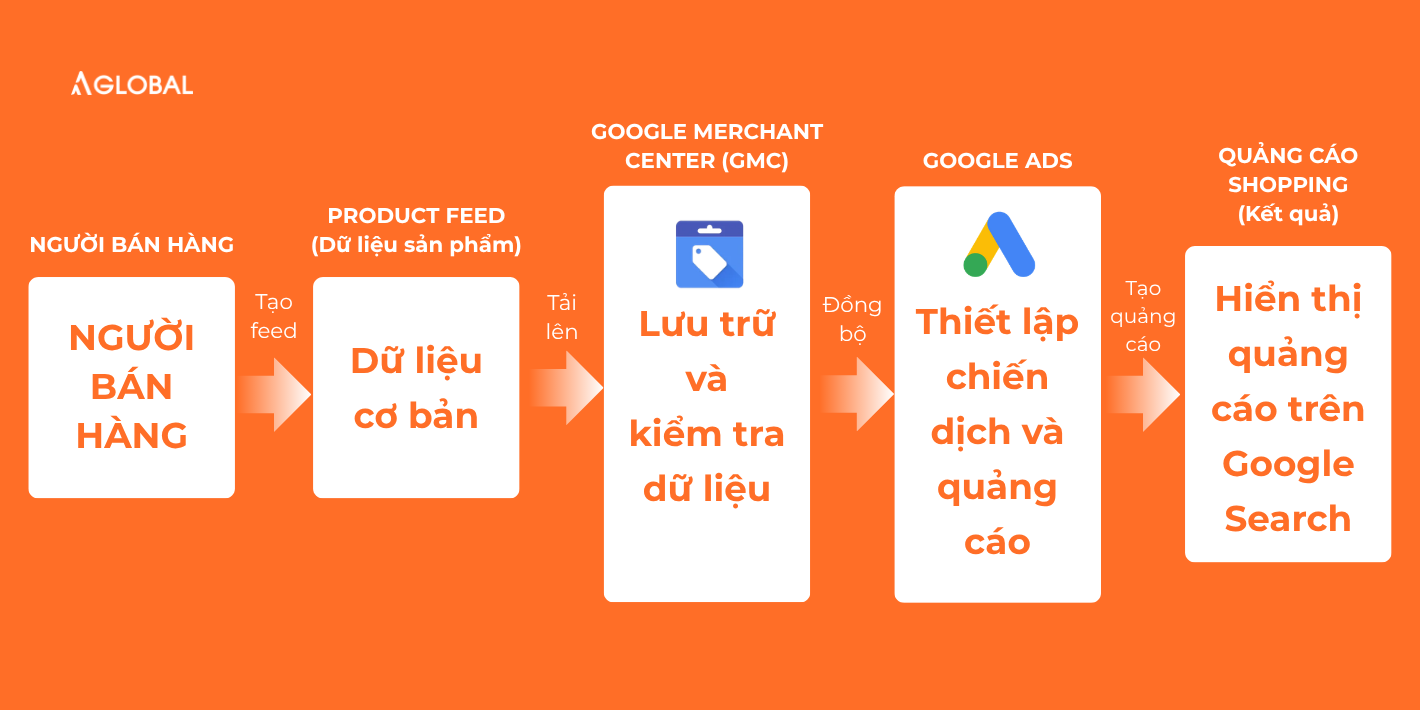
The Google Shopping ecosystem operates based on the tight synchronization of 3 core components:
- Product Feed: The foundational data block containing all mandatory product attributes (such as ID, title, description, image, price, and brand). The standardization and detail level of the Product Feed directly determine whether your ads accurately reach your target audience.
- Google Merchant Center (GMC): The storage and moderation center. This is the platform for merchants to upload, manage, and update their Product Feed files. GMC helps Google verify the validity of product information (including price and inventory status) before distributing ads.
- Google Ads: The campaign setup and management center. This platform extracts approved data from GMC to automatically generate visual shopping ad formats.
1.3. How Is Google Shopping Different from Regular Google Search?
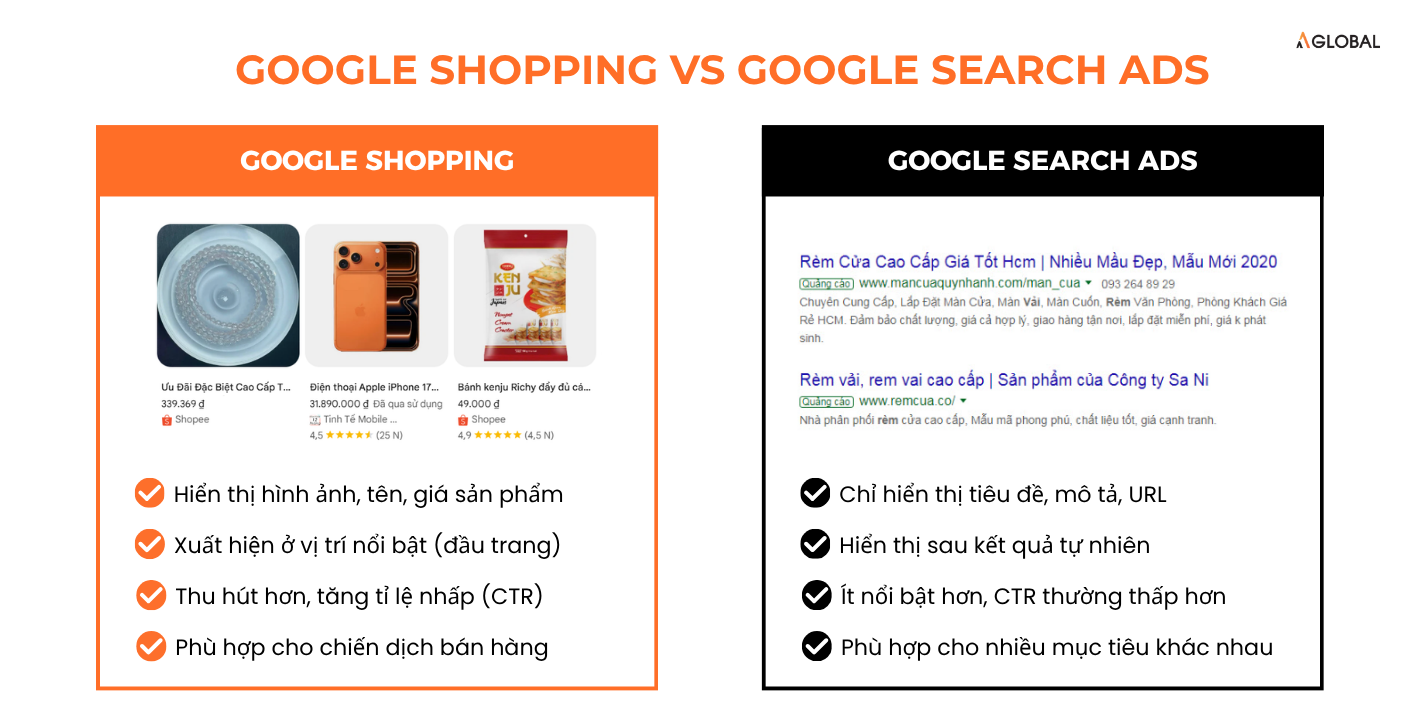
Traditional Google Search primarily returns web pages that match a query. Meanwhile, Google Shopping focuses on product information.
For example, when a user searches for a specific shoe model, Google can directly display multiple products with images, prices, and merchants, allowing users to make quick comparisons before visiting the website.
2. How to List Products on Google Shopping
Below is the basic 2-step process to get your products from your website onto Google Shopping:
Step 1: Set Up Google Merchant Center (GMC)
First, businesses need to create an official data repository on GMC and prove that their store is valid.
The basic setup process includes:
-
Create a GMC account.
-
Declare complete business information (Name, address, contact).
-
Verify and confirm website ownership.
-
Set up target markets, tax, and shipping policies.
-
Check whether the website meets Google's user safety policies.
Step 2: Connect Website and Product Feed – Bringing Products into the System
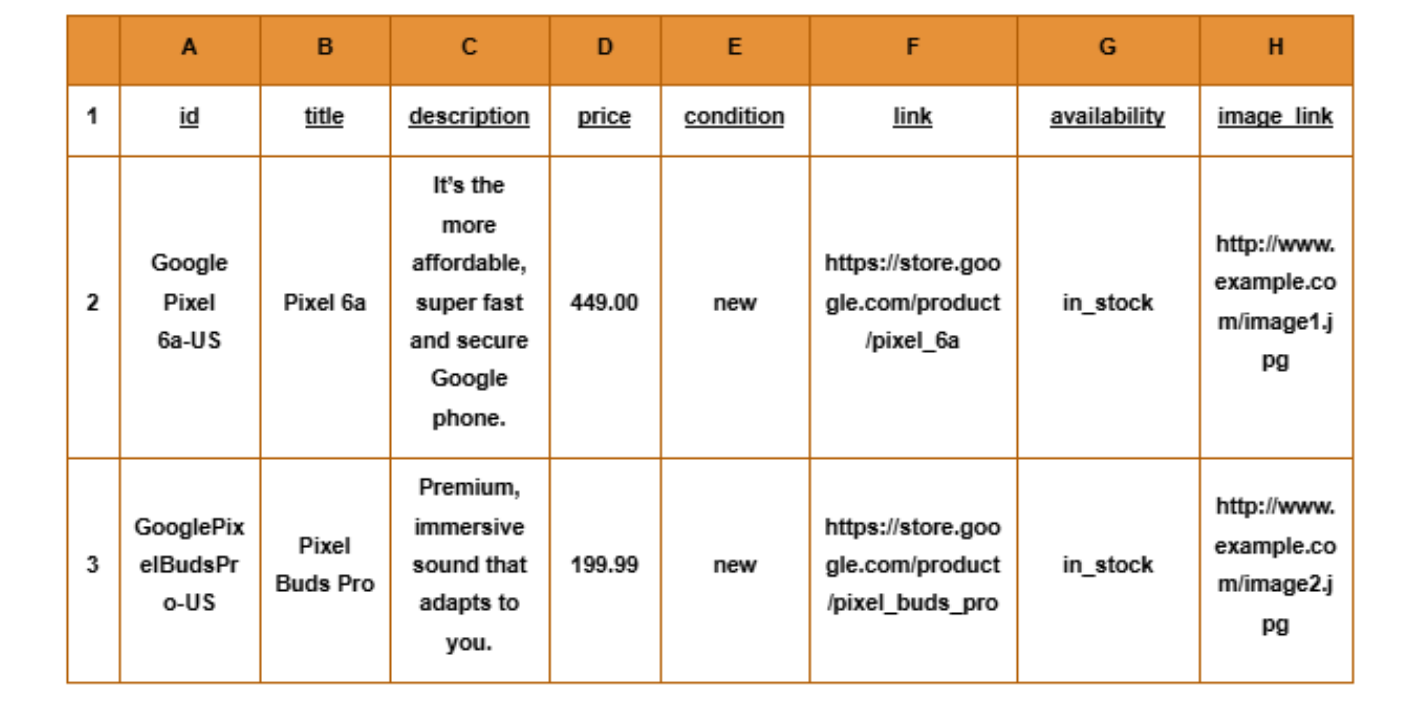
After successfully setting up GMC, businesses need to push product data from their sales website to the system via a Product Feed.
For Google to understand and create attractive ad templates, a product must be declared in a standard format with basic attributes such as ID, Title, Description, Price, Link, Image_link, and Availability. For branded products, you will need to declare additional manufacturer-provided identifiers (such as GTIN, Brand).
For small stores, merchants can use built-in integration tools to sync products. For large product catalogs, prioritized automated update solutions are recommended to minimize discrepancies between the website and GMC.
3. How to Optimize Products on Google Shopping
To boost sales on Google Shopping, businesses need to standardize product data from titles and descriptions to images according to the technical standards below.
3.1. SEO-Standardized Product Naming
Google allows titles of up to 150 characters and recommends placing important information at the beginning. The title must accurately describe the product and match the content on the landing page. Depending on the industry, prioritize attributes that customers commonly use to search for products, such as brand, model, material, color, size, or key features.
Example: "Navy Blue Premium Cotton Men's Polo Shirt Size L" provides much more information than "Premium Polo Shirt".
3.2. Perfecting Descriptions and Attributes
The description's job is to supplement information that the title cannot fully convey. Depending on the product, the description can clarify: Material, dimensions, uses, features, target audience, design, gender, and distinctive product characteristics.
3.3. Improving Image Quality
Google requires each product to have a main image and sets specific standards regarding quality, URL, and image content. Images should not contain watermarks, promotional text, borders, or placeholder images. Businesses should prioritize clear, multi-angle images that accurately represent the product being sold.
Technical Note: The minimum size requirement for product images will be enforced at $500 \times 500$ pixels starting January 31, 2027; to accommodate various display formats, Google also recommends images be $1,500 \times 1,500$ pixels or larger.
3.4. Declaring GTIN, Brand, and Manufacturer Part Number (MPN)
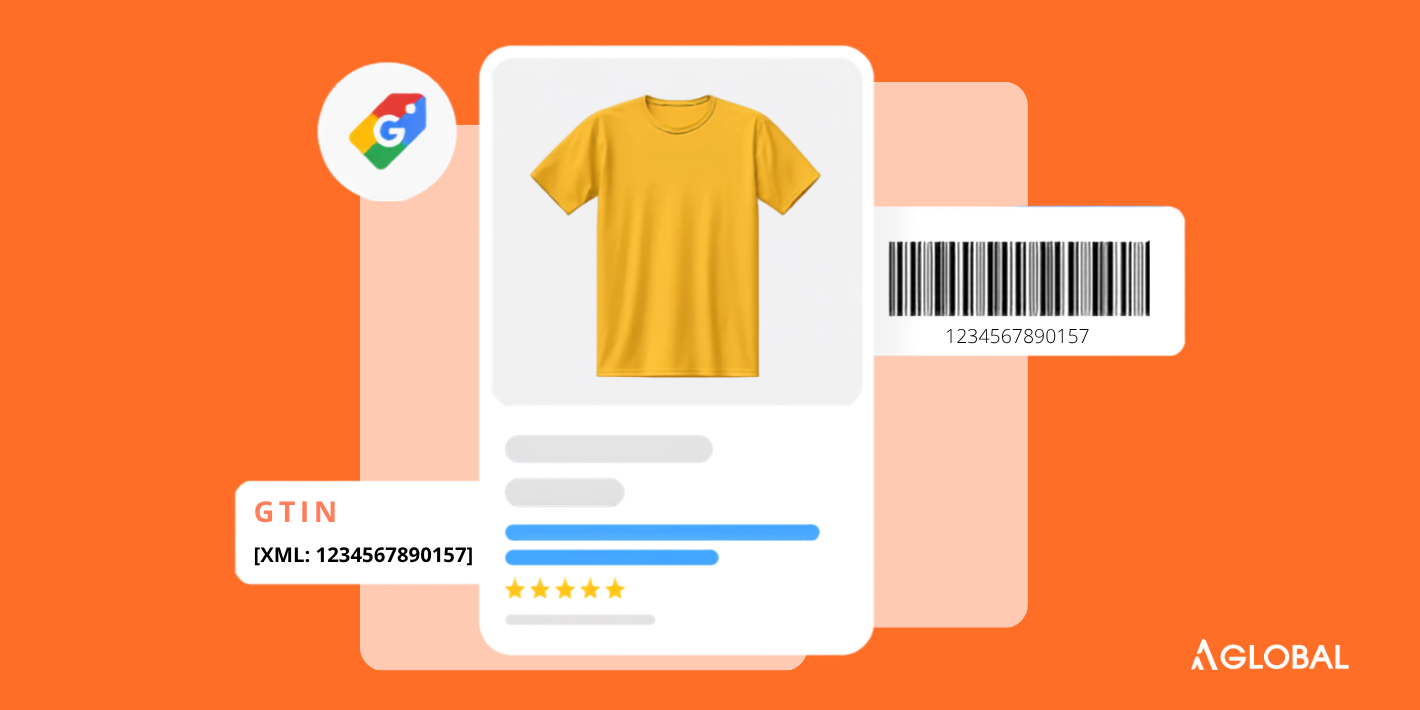
Accurately declare the GTIN (Global Trade Item Number) if your product has one. The system will cross-reference data with the GS1 organization, so you must never intentionally fill in fake codes to avoid account suspension. In case of missing GTINs: Products will suffer severe visibility restrictions and lose opportunities to participate in Google promotional programs.
For items without a GTIN (such as spare parts and components): Provide the Brand and Manufacturer Part Number (MPN) as a replacement.
Specifically for handmade or self-designed goods: Switch the identifier_exists attribute to false so Google can directly approve the listing without requiring barcodes.
Read more: Boost Product Visibility with GTIN/EAN Codes
4. Common Errors on Google Shopping and How to Fix Them
During Google Shopping implementation, products may encounter errors causing disapproval, limited visibility, or inaccurate data synchronization.
4.1. Products Disapproved by Google Shopping Due to Missing or Incorrect Data
Causes may stem from missing mandatory attributes, incorrect GTIN entries, price or inventory statuses that do not match the website, or incomplete product information updates.
How to fix: Check error notifications in GMC, correct the information accurately at the website source, and update the Feed.
4.2. Price or Inventory Mismatches with the Website
Google may warn or disapprove products when prices, availability status, or important info in the Product Feed differ from the landing page. This error typically occurs when the website changes pricing or inventory, but the Product Feed has not been updated in a timely manner.
How to fix: Re-sync data and re-export the Feed. Real-time automatic synchronization should be set up if your prices fluctuate constantly.
4.3. Landing Page Issues
Even if the Product Feed is properly set up, products can still encounter errors if the landing page is down, product info on the page doesn't match the Product Feed, or the shopping experience falls short of requirements.
How to fix: Carefully check URL functionality and fix display errors on the website before requesting Google to re-crawl the Feed.
4.4. Multiple Products Erroring Simultaneously
If multiple products in your Google Shopping account encounter the same error—such as widespread incorrect pricing, missing information, or outdated inventory—the cause typically does not lie within individual products. Instead, the issue may stem from the Product Feed or the system providing product data to Google.
How to fix: Identify commonalities among the failed items and fix the root cause in the Feed structure on your website to resolve them in bulk.
5. Where Should New Businesses Start?
For new accounts, follow this 6-step roadmap sequentially for the smoothest campaign operation:
-
Verify the website and set up a Google Merchant Center account.
-
Sync the Product Feed from the sales system to Google's system.
-
Standardize product titles and descriptions based on search behavior.
-
Check images, GTIN codes, and brand attributes.
-
Ensure prices and inventory are consistently synced with the website.
-
Monitor error reports in GMC to continuously refine performance.
If you want to explore further strategies for optimizing product visibility and driving sustainable orders, check out the article sharing effective Google advertising experience from the experts at AGlobal for a more comprehensive strategic perspective!
AGlobal is the best cross-border e-commerce solution for businesses.
Register for a free 1-on-1 consultation tailored to your business industry right here!